SEO for Membership Sites: 7 Strategies to Rank Gated Content in 2026
If you’re running a membership site in WordPress, then you’ve probably run into a frustrating problem: you publish great content, but it doesn’t show up in Google.
That usually happens because your most valuable content is hidden behind a login page or paywall. While that’s great for protecting your work and your revenue, it can make it harder for search engines to understand what your site is about and rank it in search results.
But you don’t have to choose between SEO and content protection.
With the right setup, you can help Google discover and rank your teaser content, keep your premium content safely behind a paywall, and drive more search traffic to your membership site.
In this guide, I’ll show you how SEO works for WordPress membership sites and share the strategies I use to help gated content rank the right way.
💡 Quick Answer: How Do You Do SEO for a Membership Site?
There are many ways to improve SEO for a membership site:
- Use teaser content: The best way to get your protected, members-only content indexed by Google.
- Use content dripping: Ideal for keeping members engaged over time without hurting your site’s SEO.
- Publish free content: The main strategy for attracting new visitors who are searching for your topic.
- Strengthen technical SEO: A foundational step to ensure your site is fast and easy for search engines to crawl.
- Noindex low-value pages: Helps Google focus on your valuable content by hiding pages like “login” or “my account.”
- Use internal links: The key to guiding visitors from your free articles to your paid membership offers.
- Optimize for conversions: Essential for turning the traffic you get from search engines into paying members.
Understanding the SEO Challenge of Membership Sites
Membership sites come with a unique SEO challenge: your most valuable content is often protected behind login pages, subscriptions, or paywalls.
While this is great for protecting premium content, it can make it harder for search engines to understand and rank your pages. This is because Google can only index content that it can access.
As a membership site owner, you need to find the right balance between making your content visible in search results and keeping your premium material exclusive to members.
How Google Handles Gated Content
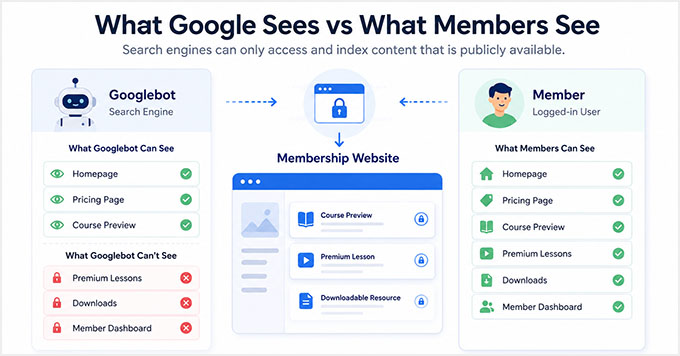
Google can index and rank content that is publicly available on your website, including teaser content that visitors can see before logging in or subscribing.
However, Google can’t access private member dashboards, locked lessons, premium downloads, or other content that requires a login.
That’s why many successful membership sites use a teaser-wall approach. This is one of the easiest and safest ways to improve SEO for gated content.
By making part of a page publicly visible, you give search engines enough information to understand and rank the content while keeping the full version reserved for members.
It’s also important to understand the difference between teaser content and cloaking. Cloaking is the practice of showing search engines different content than regular visitors see.
If done incorrectly, this can violate Google’s guidelines and create SEO problems.
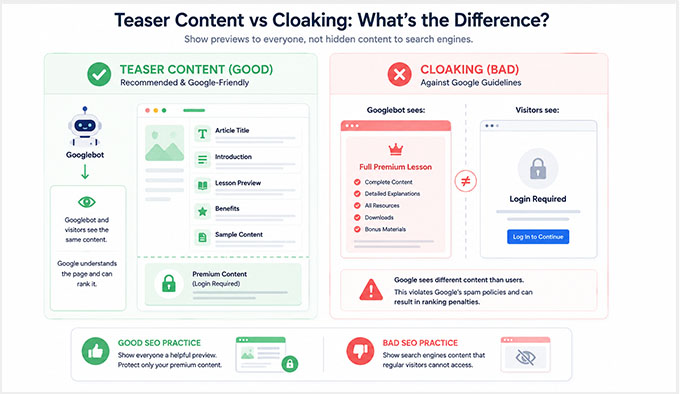
In this guide, I’ll focus on teaser-wall strategies where both visitors and Google see the same preview content.
Before You Start: Set Up Your Membership Site Properly
Before you start optimizing your membership site for SEO, it’s important to make sure your content is organized properly.
A poor site structure can hurt your SEO efforts. If you mix free and premium content together without clear organization, then both visitors and search engines may have a harder time understanding your site.
For the best results, keep your free and paid content clearly separated. This creates a better experience for your visitors and makes it easier to implement the SEO strategies
To do that, I recommend using MemberPress. It is the best WordPress membership plugin on the market and makes it easy to organize and protect your content.
It lets you create members-only areas, restrict access to specific content, and manage different membership levels from a single dashboard.
MemberPress also includes powerful features like partial content protection, content dripping, and flexible access rules. Plus, it works well alongside All in One SEO, making it a great choice for SEO-focused membership sites.
At WPBeginner, we use MemberPress to protect our free video courses. Visitors can browse the course library, but they need to register for a free account before they can access the lessons. This allows us to protect course content while still making it easy for new users to discover our training resources.
If you have not created your membership site yet, then see our complete guide on how to create a membership site with WordPress.
Now, let’s take a look at the best SEO strategies for membership sites. You can also use the links below to jump to a specific tip:
- Strategy 1: Use Teaser Content to Rank Gated Pages
- Strategy 2: Use Content Dripping Without Hurting SEO
- Strategy 3: Create Free Content That Brings Search Traffic
- Strategy 4: Strengthen Your Technical SEO Foundations
- Strategy 5: Noindex Low-Value Membership Pages
- Strategy 6: Use Internal Linking to Connect Free and Paid Content
- Strategy 7: Convert SEO Traffic Into Paying Members
- How to Measure SEO Success for Your Membership Site
- Frequently Asked Questions About Improving Membership Sites SEO
Important: These SEO strategies work together. Before moving on, it’s important to understand that these are not separate SEO methods where you choose only one strategy.
The most successful membership sites combine multiple SEO tactics together.
For example, they use teaser content to help pages rank in search results, create free content that targets valuable keywords, build internal links between free and premium content, and optimize their site to convert visitors into members.
Think of the following strategies as parts of a complete SEO system. Each one contributes to your site’s growth, but they deliver the best results when used together.
Strategy 1: Use Teaser Content to Rank Gated Pages
The easiest way to improve SEO for a membership site is to use teaser content.
Teaser content is a publicly visible preview that gives visitors and search engines a glimpse of what’s behind your membership wall.
For example, you might make the introduction, key takeaways, or first lesson available to everyone while reserving advanced lessons, downloads, and premium resources for members.
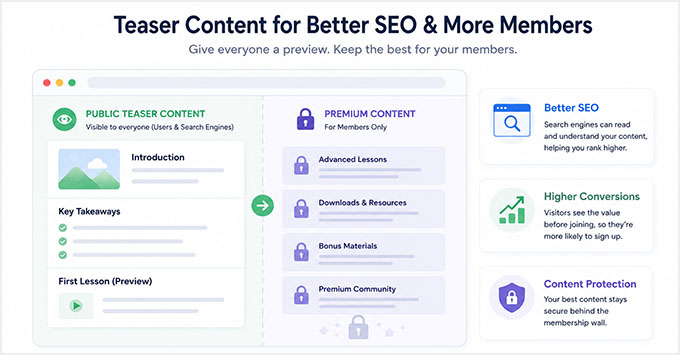
This approach works well because it gives Google content it can read and understand. As a result, your pages have a better chance of appearing in search results while your premium content remains protected.
I’ve also found that teaser content can improve conversions. When visitors can see the value of your content before signing up, they are often more willing to become members.
SEO Best Practices for Teaser Content
To get the best results, make sure your teaser contains enough information for both visitors and search engines to understand what the page is about.
Here are a few simple guidelines I recommend:
- Include your primary keyword naturally in the visible section.
- Add important headings and summaries above the paywall.
- Make the preview feel useful and complete on its own.
- Avoid hiding all of the important context behind the membership wall.
- Aim for at least 200–300 words of publicly visible content whenever possible.
The goal is to help visitors understand the value of your content while giving search engines enough information to rank the page.
How to Set Up Teaser Content in MemberPress
MemberPress makes it easy to create teaser content by showing part of a page or post to everyone while keeping the rest available only to members.
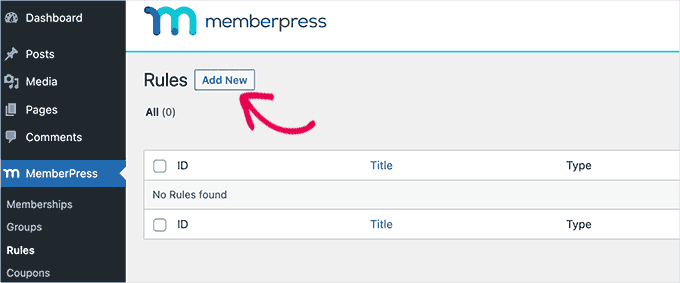
To get started, go to MemberPress » Rules in your WordPress dashboard and click ‘Add New.’
Next, choose the content you want to protect. MemberPress allows you to restrict individual posts and pages as well as entire categories, tags, or other groups of content.
This is especially helpful if you plan to create lots of members-only content in the future.
For example, you might restrict all posts in a “Premium Content” category instead of creating separate rules for each article.
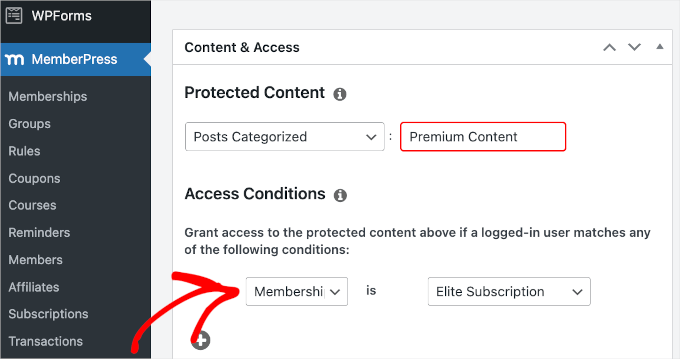
After selecting the content you want to protect, scroll down to the ‘Access Conditions’ section and choose which membership level should have access.
Next, enable content excerpts in the ‘Unauthorized Access’ section. This is what creates your teaser content.
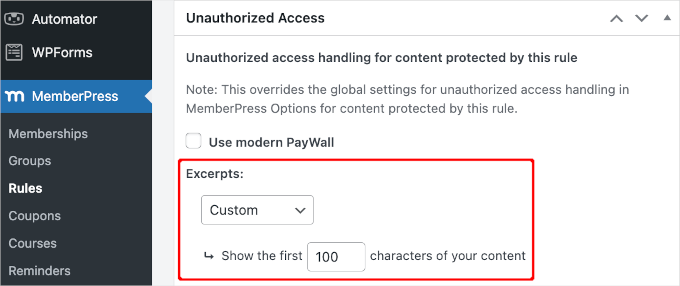
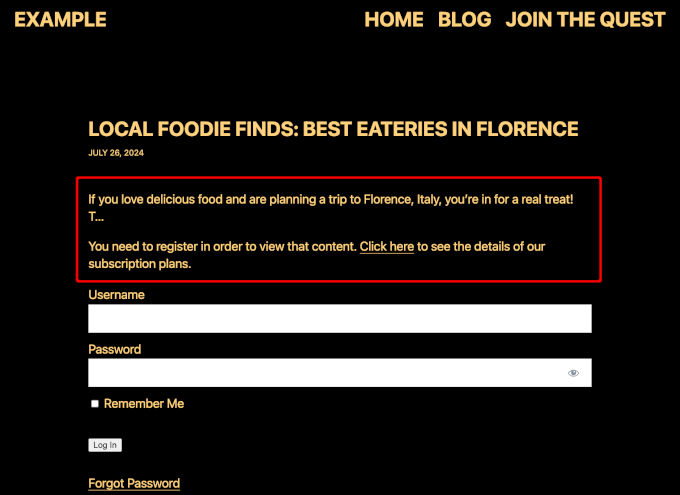
MemberPress allows you to show a portion of the protected content before the paywall appears. For example, you might display the introduction or the first few paragraphs of an article while keeping the rest locked. When the excerpt ends, users will see an ‘Unauthorized Access’ message.
🚀Pro Tip: I highly recommend customizing this message to include a direct link to your pricing or registration page to easily convert these readers into paying members.
When deciding how much content to reveal, make sure the preview provides enough context for visitors and search engines to understand what the page is about. At the same time, it should leave readers wanting to access the full content.
For detailed instructions, I suggest taking a look at our guide on creating a paywall in WordPress.
Do You Need Paywalled Content Schema?
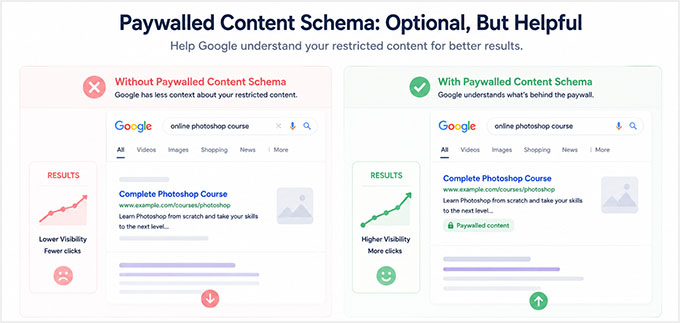
You may have heard about paywalled content schema markup and wondered if you need it. For most teaser-wall setups, the answer is no.
Paywalled content schema is structured data that tells Google which parts of a page sit behind a paywall. It uses properties like isAccessibleForFree, hasPart, and cssSelector to point at the restricted section.
But it has one specific job, and it is not the job that most membership sites need.
This markup is built for sites that serve Googlebot the full gated content so it can be crawled and indexed, while keeping it locked for regular visitors.
The schema is what tells Google this is a legitimate paywall and not cloaking. That mostly applies to news and subscription publishers.
With the teaser-wall setup in this guide, you do not need it. Google and your visitors see the same public preview, and the full content is never served to anyone.
So there is no cloaking to clarify, and the markup gives you no ranking or rich-result benefit. If you are using a teaser wall, you can skip schema entirely and still rank your gated pages.
The one exception is a full-content setup, where you serve the whole article to search engines but lock it for visitors. If that is you, then you can add the markup with AIOSEO‘s Custom Schema Builder, making sure the cssSelector matches the actual class of your paywalled container.
What to Do If Google Doesn’t Index Your Content
If your gated page isn’t appearing in Google search results, then this is usually caused by a simple configuration setting rather than the paywall itself.
Here’s a quick checklist I recommend working through before troubleshooting anything more advanced:
| What to Check | Where to Find It | What to Look For |
|---|---|---|
| Noindex Settings | Edit the page and scroll to AIOSEO Settings » Advanced | Make sure ‘No Index’ is disabled for the page. |
| Teaser Content Visibility | Open the page in an incognito browser window | Confirm that visitors can view the teaser content without logging in. |
| Robots.txt Rules | All in One SEO » Tools » Robots.txt Editor | Check that the page or content section isn’t blocked from search engines. |
| URL Inspection Tool | Google Search Console » URL Inspection | Test the page and see whether Google can crawl and index it successfully. |
| Request Indexing | Google Search Console » URL Inspection | If everything looks correct, click Request Indexing to ask Google to recrawl the page. |
If the page still isn’t appearing in search results, then you may want to look at our following guides:
- Why Did My WordPress Site Get De-Indexed From Google?
- How Do I Get My WordPress Site Listed on Google? (Beginner’s Guide)
- How to Check If Your WordPress SEO Is Actually Working
Strategy 2: Use Content Dripping Without Hurting SEO
Once you’ve set up teaser content, the next logical step is deciding when members get access to your premium content.
Many membership site owners do this using content dripping, which gradually releases content over time instead of making everything available immediately.
For example, if you’re running an online course, then you might unlock one lesson each week. Similarly, you could release new training modules a certain number of days after a member signs up.
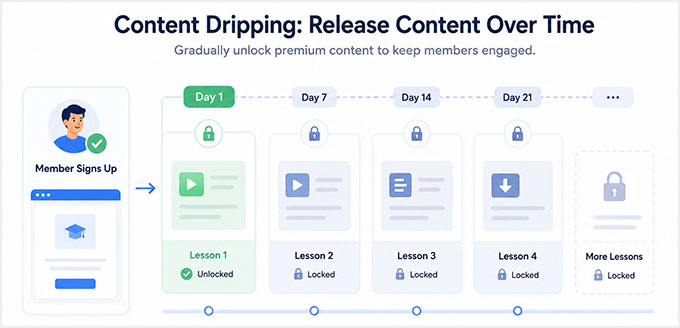
Content dripping can help improve engagement and keep members coming back to your site. However, it’s important to understand how it affects SEO.
How Content Dripping Affects SEO
Content dripping isn’t bad for SEO, but there are a few things to keep in mind:
- Google can’t index content that hasn’t been released yet.
- Fully hidden lessons and modules typically won’t rank in search results.
- Dripped content usually becomes eligible for indexing only after it becomes accessible.
For this reason, I recommend creating teaser content for upcoming lessons and modules before they are released.
Even a short introduction, lesson summary, or overview page can help search engines understand what the content is about while members wait for the full lesson to unlock.
💡 Expert Tip: Optimize Your Video Content for Search
If your membership site includes video courses, then don’t forget about video SEO.
One strategy I’ve found particularly effective is creating a public landing page for each premium video or course module.
You can include a short teaser clip, lesson summary, transcript, or key takeaways while keeping the full training reserved for members.
This gives search engines content they can index and helps potential members understand the value of your course before signing up.
This allows you to build search visibility early without giving away your premium content.
How to Configure Drip Rules in MemberPress
MemberPress makes it easy to schedule content releases.
Simply go to MemberPress » Rules and edit the rule that controls access to your protected content. Next, scroll to the ‘Drip / Expiration’ setting and enable content dripping.
You can then choose how and when content should become available. For example, MemberPress allows you to:
- Release content on a specific date.
- Unlock content a certain number of days after signup.
- Create recurring release schedules for ongoing training programs.
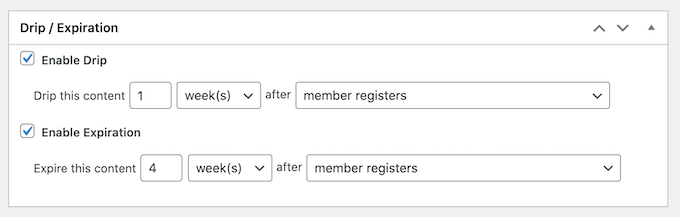
Make sure that you also create teaser content for any lessons or membership content that won’t be released right away.
This helps search engines discover and understand those pages before the full content becomes available to members.
For detailed instructions, see our guide on how to add drip content in WordPress.
Strategy 3: Create Free Content That Brings Search Traffic
One mistake I’ve seen many membership site owners make is putting everything behind a paywall.
While that may seem like the best way to increase memberships, it can actually make it much harder to grow your organic traffic. After all, if most of your content is locked, then search engines have fewer opportunities to discover and rank your website.
That’s why the most successful membership sites don’t gate everything.
Instead, they use free content to attract visitors from search engines and then encourage them to join their membership program for more advanced resources.
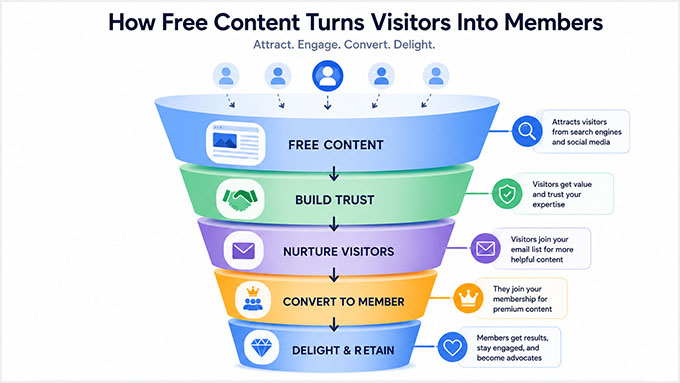
Free content can help you:
- Attract search traffic from Google.
- Reach people who are new to your topic.
- Earn backlinks from other websites.
- Build trust with potential members.
- Introduce visitors to your premium offerings.
Think of your free content as the front door to your membership site. It helps new visitors discover your expertise, while your premium content gives them a reason to become members.
Use Keyword Research to Build a Membership Funnel
When planning your content strategy, I recommend targeting broad informational keywords with free content and reserving your most valuable training, templates, and systems for members.
For example, if you run a membership site that teaches people how to build and grow websites, then your content funnel might look something like this:
| Free SEO Content | Premium Membership Content |
|---|---|
| How to Start a Membership Site | Full video course |
| Best WordPress Membership Plugins | Complete setup templates |
| Membership Site SEO Tips | Advanced SEO training |
This approach allows your free content to rank in search results and attract new visitors while your premium content provides the deeper value that encourages people to join.
Decide What Should Be Free vs. Premium
One question I hear often is: “How do I decide what to make free and what to put behind a paywall?”
A simple rule is to make content free when its main purpose is attracting new visitors. Then, reserve your most valuable implementation resources, systems, and training for members.
Here’s a framework that works well for many membership sites:
| Make It Free | Gate It Behind a Membership |
|---|---|
| Content targeting broad search keywords | Advanced implementation guides |
| Beginner tutorials and educational content | Premium courses and training programs |
| Content designed to attract backlinks | Templates, worksheets, and downloads |
| Top-of-funnel educational resources | Proprietary systems and frameworks |
| Content that introduces your expertise | Member-exclusive tools and resources |
This gives you the best of both worlds. Your free content helps you grow traffic and reach new audiences, while your premium content provides a strong reason for visitors to upgrade.
Build Trust With E-E-A-T Signals
Creating free content isn’t just about getting more traffic. It’s also one of the best ways to build trust with potential members.
This is especially important because many membership sites sell access to expertise, training, coaching, or specialized knowledge. Before someone pays for a membership, they want to know why they should trust you.
That’s where E-E-A-T comes in. It stands for Experience, Expertise, Authoritativeness, and Trustworthiness.
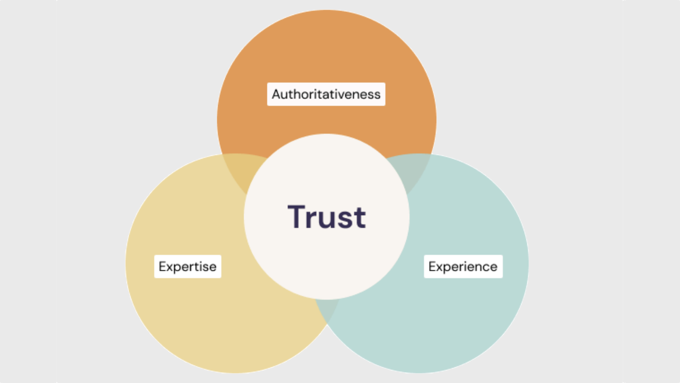
One of the easiest ways to improve E-E-A-T is to demonstrate real-world experience. Whenever possible, share examples from your own projects, testing, results, or case studies.
You can also strengthen trust by:
- Adding detailed author bios.
- Highlighting relevant credentials and expertise.
- Including member testimonials and success stories.
- Displaying reviews and social proof.
- Sharing real examples of your methods in action.
At WPBeginner, we do this by sharing our hands-on experience with the tools and strategies we recommend.
We also have dedicated author pages, editorial guidelines, and review processes that help readers understand who created the content and why they can trust it.
If you’re just getting started, then I recommend checking out the following tutorials:
- How to Setup Author SEO in WordPress to Boost Your Google E-E-A-T
- How to Get Your WordPress Content Cited by AI Tools (My Expert Tips)
- What Is Google E-E-A-T? A Detailed Guide to WordPress Websites
Strategy 4: Strengthen Your Technical SEO Foundations
Even the best content strategy can struggle if your website has technical SEO problems.
Some membership site owners spend a lot of time creating teaser content, publishing SEO-focused articles, and building premium courses, only to discover that technical issues were holding their rankings back.
Search engines need to be able to crawl, understand, and access your content efficiently. Here are a few technical SEO basics I recommend checking before moving on to more advanced strategies:
| Technical SEO Factor | Why It Matters | How to Improve It |
|---|---|---|
| HTTPS Security | Protects user data and is a Google ranking signal. | Install an SSL certificate and make sure your site loads over HTTPS. |
| Site Speed | Faster websites provide a better user experience and often rank higher in search results. | Use a caching plugin, optimize images, and choose a fast WordPress hosting provider. |
| Mobile-Friendly Design | Google primarily uses the mobile version of your website for indexing and rankings. | Use a responsive WordPress theme and test your site on different screen sizes. |
| Broken Links and 404 Errors | Broken pages create a poor user experience and can waste crawl budget on very large sites. | Regularly audit your website and fix or redirect broken URLs using the free Broken Link Checker plugin by AIOSEO. |
| XML Sitemaps | Help search engines discover and index your content more efficiently. | Use AIOSEO to generate and maintain XML sitemaps. |
You don’t need to perfect every technical SEO setting before your membership site can rank.
Start by fixing the basics listed above. Once your site is secure, fast, mobile-friendly, and easy for search engines to crawl, you’ll have a much stronger foundation for the membership site SEO.
Strategy 5: Noindex Low-Value Membership Pages
When most people think about SEO, they focus on getting more pages indexed.
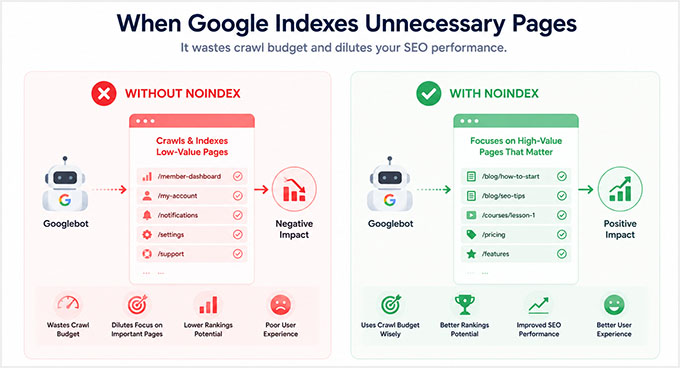
However, an important part of SEO is helping search engines focus on your most valuable content. That’s where noindexing comes in.
By preventing low-value pages from appearing in search results, you help keep your index focused on the pages that can actually bring traffic to your website. Crawl budget can also be a factor, but that mainly matters for very large websites with thousands of pages, so most membership sites do not need to worry about it.
Why Noindexing Helps Membership Site SEO
Many membership sites contain pages that serve an important purpose for members but provide little value in search results.
For example, a login page is useful if someone already has an account. However, it doesn’t answer search queries or help new visitors discover your website.
The same is true for account pages, member dashboards, checkout pages, and thank-you pages.
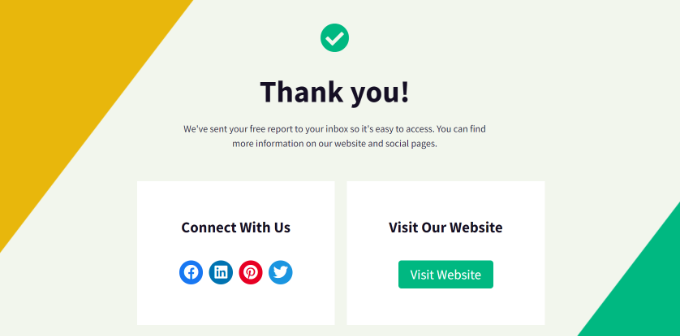
When these pages appear in search results, they pull attention away from your course previews, blog posts, landing pages, and other content designed to attract search traffic.
Noindexing low-value pages helps keep your index focused on content that can generate rankings, clicks, and new memberships.
Which Pages Should Be Noindexed?
As a general rule, I recommend noindexing pages that you designed for existing members rather than new visitors.
Here are some common examples:
| Page Type | Why It Should Be Noindexed |
|---|---|
| Login Pages | Useful for members, but provide little value in search results. |
| Account Pages | Contain user-specific information and are not intended for public discovery. |
| Checkout Pages | Designed for conversions rather than search traffic. |
| Thank-You Pages | Only relevant after a purchase or registration. |
| Member Dashboards | Usually contain private content and member navigation. |
On the other hand, you typically should not noindex content that can attract new visitors, such as:
- Blog posts
- Course landing pages
- Teaser content pages
- Resource hubs
- SEO-focused content targeting keywords
These pages are often responsible for bringing new traffic into your membership funnel.
How to Noindex Pages in AIOSEO
The easiest way to noindex a page in WordPress is with All in One SEO.
To get started, edit the page you want to remove from search results. Next, scroll down to the ‘AIOSEO Settings’ area and switch to the ‘Advanced’ tab.
From here, locate the ‘Robots Meta’ settings and toggle the ‘Use Default Settings’ switch to ‘OFF’.
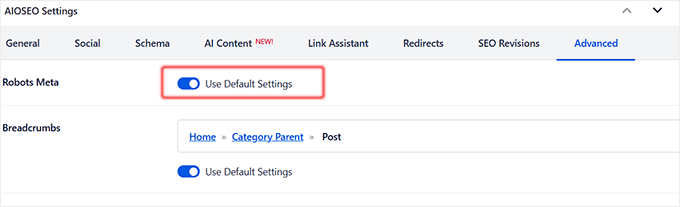
This will reveal the manual checkboxes where you have to check the ‘No Index’ option.
Once you’ve saved or updated the page, AIOSEO will add the appropriate noindex directive so search engines know not to include that page in their search results.

Keep in mind that it can take time for Google to recrawl your page and process the noindex directive. This might take anywhere from a few days to several weeks.
If you need more information, you can also see our guide on how to stop search engines from crawling your WordPress site.
Strategy 6: Use Internal Linking to Connect Free and Paid Content
Up until now, you’ve learned how to attract visitors with free content and protect your premium resources behind a membership wall.
The next step is making sure those visitors can easily find their way from your free content to your paid offerings.
That’s where internal linking comes in.
Many membership site owners create great blog posts and resource pages that attract search traffic, but they forget to connect that traffic to their membership program.
As a result, visitors consume the free content and leave without ever discovering the premium resources available on the site.
Why Internal Links Matter
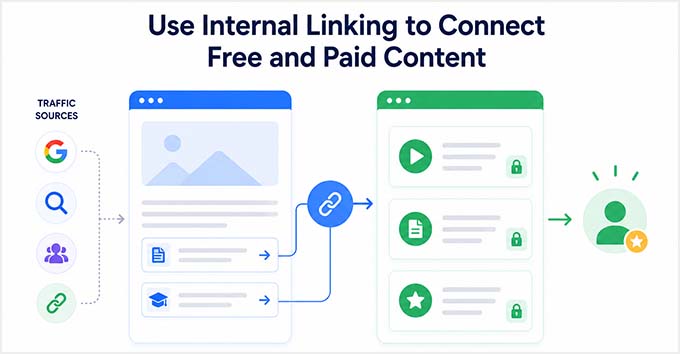
Internal links are links that point from one page on your website to another page on the same site. They help SEO in several ways by:
- Allowing Google to understand the structure of your website.
- Passing authority between related pages.
- Helping search engines discover important content.
- Guiding visitors toward your membership offers and conversion pages.
Think of internal links as bridges between your free content and your premium content.
For example, someone might find your website through a beginner tutorial they discovered on Google. A well-placed internal link can then guide them to a premium course, membership landing page, or exclusive training resource.
Internal Linking Best Practices for Membership Sites
One of the simplest ways to improve your membership site’s SEO and conversions is to create clear paths between related content.
Here are a few examples:
| Free Content | Link To |
|---|---|
| Blog posts | Premium course pages |
| Beginner tutorials | Membership signup pages |
| Resource guides | Premium templates and downloads |
| Course previews | Full membership programs |
| Free lessons | Advanced training modules |
When adding internal links, use descriptive anchor text whenever possible. This helps both visitors and search engines understand what they’ll find after clicking the link.
For example, instead of using generic text like “Click here”, you could use:
‘Get the full training inside our membership program.’
This link is more helpful because it clearly explains the benefit of clicking through. For more tips, you may want to see our guide on internal linking for SEO.
Create a Path From Traffic to Memberships
One simple rule I recommend is this:
Every high-traffic page should guide visitors toward a monetized page.
That doesn’t mean filling your content with sales pitches. Instead, look for natural opportunities to recommend a relevant course, membership tier, premium resource, or training program.
At WPBeginner, we use internal links and content clusters throughout our blog to help readers discover related tutorials, tools, and resources.
The same strategy works extremely well for membership sites because it helps turn search traffic into paying members.
Strategy 7: Convert SEO Traffic Into Paying Members
Getting more traffic from Google is important, but traffic alone doesn’t grow a membership business.
I’ve seen membership site owners spend months improving their rankings, only to discover that very few visitors were actually becoming members.
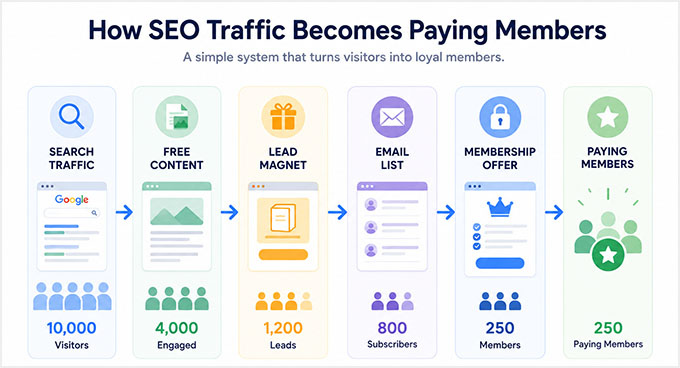
To grow your membership site, you need a system that turns search traffic into subscribers and paying members.
Use OptinMonster to Convert Organic Traffic
One of the easiest ways to do this is with OptinMonster.
It’s the best lead generation and conversion optimization tool on the market, and we’ve used it across several of our websites to grow email lists, promote offers, and bring visitors back to our content.
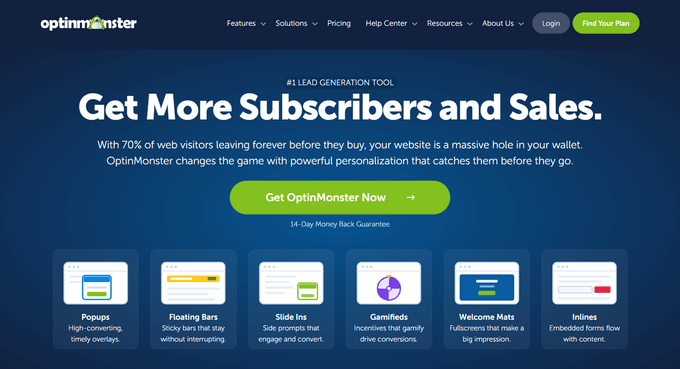
OptinMonster also integrates with MemberPress, allowing you to automatically target visitors who aren’t members yet. This makes it easy to promote memberships, free trials, and premium resources at exactly the right moment.
Here are a few campaign types that work particularly well for membership sites:
Exit-Intent® Popups
Exit-Intent® technology detects when a visitor is about to leave your website and displays a targeted offer before they exit.
This can be a great opportunity to offer:
- A free trial
- A membership discount
- A free course
- A bonus resource
For example, if someone has just finished reading one of your tutorials, you could offer them access to a premium course or a limited-time membership discount before they leave your site.

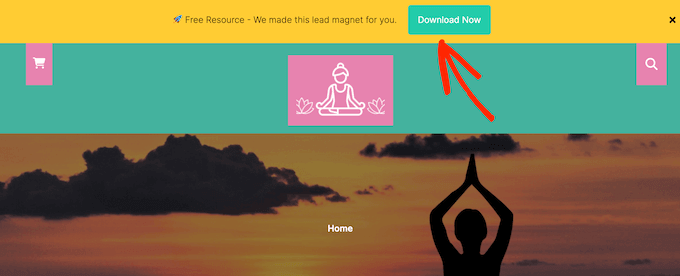
Inline Content Upgrades
Inline content upgrades appear directly inside your content, making them feel like a natural next step rather than an advertisement.
For example, if you’re writing a blog post about membership site SEO, then you could promote:
- A downloadable checklist
- A premium template
- A complete video course
- Member-only training resources
Because these offers are highly relevant to the content visitors are already reading, they often convert very well.
Scroll-Based Slide-ins
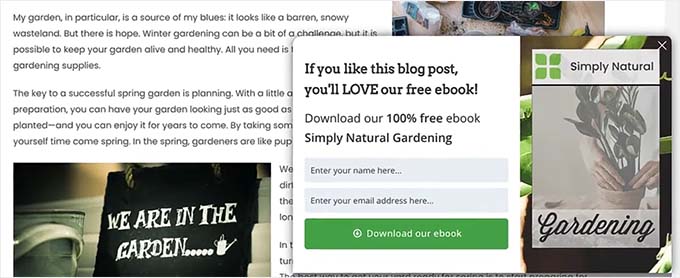
Scroll-based slide-ins appear after a visitor has engaged with your content by scrolling down the page.
Since these campaigns are triggered after someone has already shown interest in your content, they tend to feel less intrusive than traditional popups.
For example, after a visitor reads 50% or 75% of an article, you could display a slide-in promoting:
- Your membership program
- A free trial
- An upcoming webinar
- Premium training resources
This can be an effective way to increase signups without disrupting the user experience.
Recommended Membership SEO Funnel
By now, you’ve seen that successful membership site SEO is about more than rankings.
The goal is to create a clear path that moves visitors from search engines to your membership program. A simple funnel might look like this:
SEO Traffic → Free Content → Teaser Preview → OptinMonster Campaign → Membership Signup
Here’s how each step works:
| Step | Purpose |
|---|---|
| SEO Traffic | Visitors discover your website through Google. |
| Free Content | Helpful articles build trust and answer questions. |
| Teaser Preview | Visitors get a glimpse of your premium content. |
| OptinMonster Campaign | Targeted offers encourage visitors to take action. |
| Membership Signup | Visitors become members and gain access to premium resources. |
Each step supports the next one. That’s why the most successful membership sites don’t rely on a single tactic.
Instead, they combine SEO, free content, teaser pages, internal linking, and conversion optimization into a complete system that attracts visitors and turns them into members.
How to Measure SEO Success for Your Membership Site
After putting in the work to optimize your membership site for SEO, you’ll want to know whether those efforts are actually paying off.
Tracking your results can help you identify what’s working, uncover new opportunities, and focus your time on the strategies that bring in the most members.
Key SEO Metrics to Track
When reviewing your SEO performance, I recommend paying attention to these metrics:
| Metric | Why It Matters |
|---|---|
| Organic Traffic | Shows how many visitors are finding your site through search engines. |
| Keyword Rankings | Helps you track how well your content is performing for target keywords. |
| Traffic to Free and Teaser Content | Shows which pages are attracting potential members. |
| Membership Signups | Measures how many visitors are joining your membership program. |
| Conversion Rate | Helps you understand how effectively your content turns visitors into members. |
| Backlinks | Indicates whether other websites are recommending and linking to your content. |
Rather than focusing on rankings alone, I recommend paying close attention to membership signups and conversion rates.
After all, the goal isn’t just to get more traffic, it’s to grow your membership business.
Track SEO Performance With MonsterInsights
The easiest way to track SEO performance in WordPress is with MonsterInsights.
It’s the best Google Analytics plugin for WordPress, and we use it across our partner brands to understand how visitors find and interact with our websites.
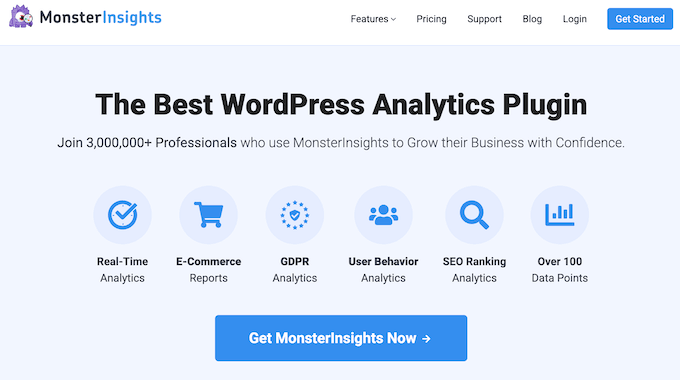
MonsterInsights brings Google Analytics data directly into your WordPress dashboard, so you don’t have to spend time digging through complicated reports.
For membership sites, this makes it much easier to answer questions like:
- Which blog posts attract the most search traffic?
- Which teaser pages generate the most views?
- Which content drives the most membership signups?
- Where are your highest-converting visitors coming from?
You can also set up conversion tracking to measure how many visitors complete important actions on your site, such as registering for a free account, starting a trial, or purchasing a membership.
By regularly reviewing these reports, you’ll quickly identify which content attracts the most visitors and which pages do the best job of turning those visitors into members.
If you’d like help getting started, then see our guide on how to see if your WordPress SEO is actually working.
Frequently Asked Questions About Improving Membership Sites SEO
Membership site SEO can feel a little different from traditional SEO, especially when you’re working with paywalls, gated content, and member-only areas.
Here are some of the questions I hear most often from membership site owners.
Does Google penalize gated content?
No, Google does not penalize properly implemented gated content.
Many successful membership sites use paywalls and member-only areas. Problems typically come up when websites use deceptive techniques like cloaking that show different content to search engines and visitors.
As long as you’re using teaser content and following Google’s guidelines, gated content can work well for SEO.
Can Google index content behind a login wall?
No, Google cannot access content that requires a login.
Since Googlebot can’t create an account or sign in to your membership site, it generally won’t be able to crawl content hidden behind a login wall.
That’s why teaser content is so important. It gives search engines enough information to understand and rank your pages.
Will ChatGPT or Google AI Overviews surface my gated content?
No. AI search tools like ChatGPT, Perplexity, and Google AI Overviews can’t log in or subscribe, so just like Googlebot, they can’t reach content behind a login or paywall. Your gated content stays invisible to them, and that’s expected.
Your public teaser content is a different story. These tools can read and cite it, so the same teaser strategy that helps you rank in normal search also makes you eligible for AI answers. Google AI Overviews use the standard search index and the normal SEO rules, so there’s no separate AI optimization or opt-in to set up.
Should I noindex login and account pages?
Yes, in most cases you should noindex login and account pages. These pages provide little value in search results and are designed for existing members rather than new visitors.
What is the difference between gated and paywalled content?
Gated content requires users to take an action before accessing the content. That action might be creating an account, joining an email list, or filling out a form.
Paywalled content is a specific type of gated content that requires users to purchase a subscription or membership before they can access it.
How much content should I show before the paywall?
I recommend showing at least 200–300 words of content before the paywall. Another common approach is to make roughly 10–20% of the content publicly visible.
Whatever approach you choose, make sure the visible section includes important context, headings, and your target keyword so search engines can understand what the page is about.
Will content dripping hurt SEO?
No, content dripping does not directly hurt SEO. However, unreleased content typically can’t rank until it becomes accessible to search engines.
That’s why I recommend creating teaser pages for upcoming lessons and training modules whenever possible.
Do backlinks matter for membership site SEO?
Yes, backlinks remain one of the most important ranking factors for membership sites.
The challenge is that premium content often sits behind a paywall, making it harder for other websites to link to it. That’s why I recommend creating high-quality free resources that naturally attract backlinks, such as:
- Beginner guides and tutorials
- Statistics and research pages
- Free tools and resources
- Downloadable checklists and templates
- Guest posts on relevant websites
Focus on earning backlinks to your free content, then use internal links to guide those visitors toward your membership offers and premium resources.
I hope this article helped you learn how to rank your gated content. You may also want to see our guide on using a video membership site to grow your email list and our automation tricks to reduce churn on your membership site.
If you liked this article, then please subscribe to our YouTube Channel for WordPress video tutorials. You can also find us on Twitter and Facebook.
The post SEO for Membership Sites: 7 Strategies to Rank Gated Content in 2026 first appeared on WPBeginner.